
Kakobuy top-up channels and the fees they carry
PayPal, cards, Alipay and WeChat Pay all fill the same balance. The published help pages describe different fee and currency paths, and some conflict. Confirm the actual payment method, fee and credited amount at checkout.
Choosing the top-up channel
- At stake on the reference order
- US$12.57 for one PayPal top-up of US$350.58, enough for the reference order's goods and its lowest-priced US line.
- The part you control
- The channel, how many separate top-ups you make, and the currency you pay from.
- Where it trades places with the next lever
- Once a single PayPal top-up passes about US$412, its fee is larger than the US 1 kg line gap.
- 1Exchange rateUS$24.48
- 2ConsolidationUS$16.48
- 3Shipping lineUS$14.73
- 4Top-up channelUS$12.57
- 5Add-onsUS$5.49
What each top-up channel lists in fees
The recharge article and the payment-method articles in the help centre, read on 10 October 2026, give the following. Wise also has a help article, created in January 2023 during what it calls website testing; it does not list a current fee.
On a small screen, scroll the table to compare every column.
| Channel | What it is | Currency step | Listed handling |
|---|---|---|---|
| PayPal | Visa, Mastercard, American Express, JCB and some bank cards through PayPal | Converted to US dollars | 3.5% + US$0.30 (help id 65 says 2.9% + US$0.30) |
| International credit card | Runs through PayPal's card channel, per the help centre | Converted to US dollars | As PayPal |
| Alipay | Chinese wallet | Paid in yuan | No handling charge; 1-60 minutes to credit |
| WeChat Pay | Chinese wallet linked to a bank card | Paid in yuan | No handling charge; 1-60 minutes to credit |
| Balance | Money already topped up | No new conversion | None |
PayPal fees: the percentage and the fixed part
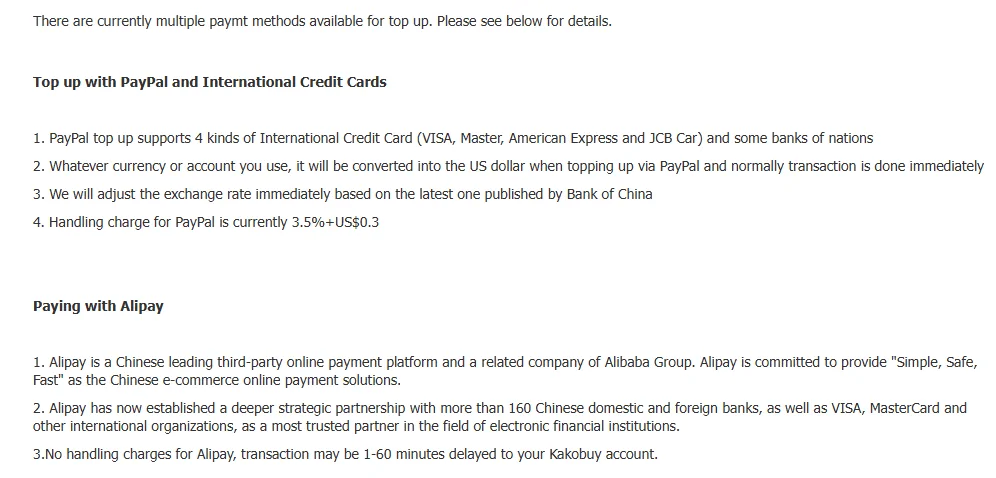
The listed PayPal charge has two parts: 3.5% of the amount and US$0.30 per top-up. On US$50 that is US$2.05; on US$200 it is US$7.30; on the reference order's US$350.58 it is US$12.57.
The percentage is the part that matters on big orders and the fixed part is the one that punishes many small top-ups. Paying goods and freight as two PayPal payments adds a second US$0.30. Paying each of five items separately adds five.
An older help article puts it more loosely, saying the handling fee is subject to the amount at the time of payment. The published examples conflict, so 3.5% plus US$0.30 is only our calculation assumption. Check the checkout counter, which shows a handling fee line before you confirm.
The PayPal fee, written three ways by Kakobuy itself
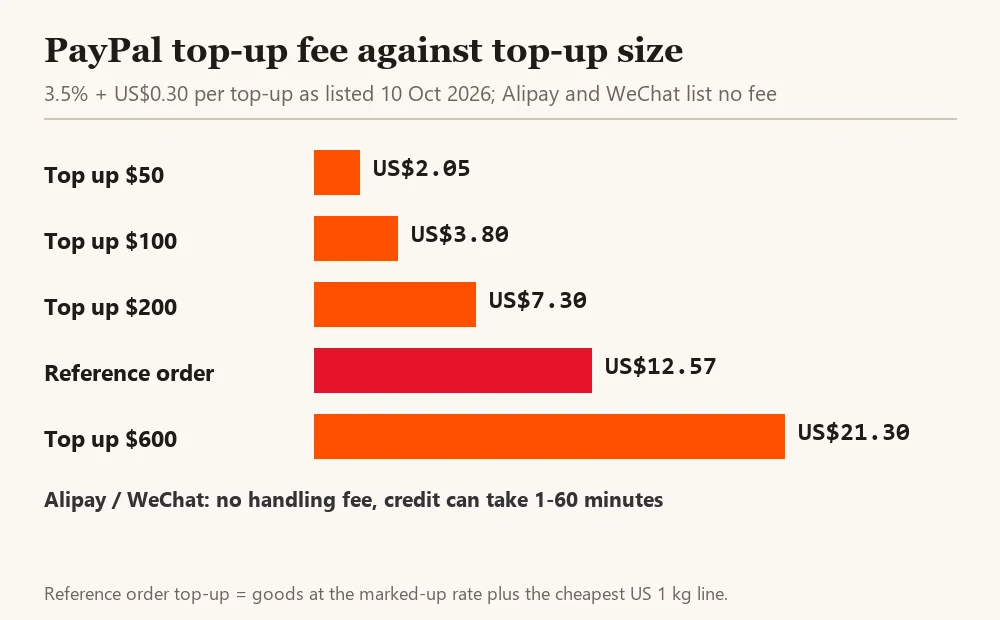
Kakobuy does not state its PayPal charge consistently. On 10 October 2026 the recharge article (help id 64) and the deposit-method article said 3.5% + US$0.30. The separate PayPal article (help id 65) said 2.9% + US$0.30. And the checkout screenshot inside that same PayPal article shows a processing fee of US$4.51 on US$149.99, worked out as the amount times 0.03 plus 0.01, which is a third formula again.
On US$350 the three versions come to about US$12.55, US$10.45 and US$10.51. We use the highest, 3.5% + US$0.30, in every figure and in the calculator, so the lever is not understated. The number that actually binds you is the handling fee line on the checkout counter at the moment you pay; read it there.
Alipay and WeChat Pay: check the method and credit
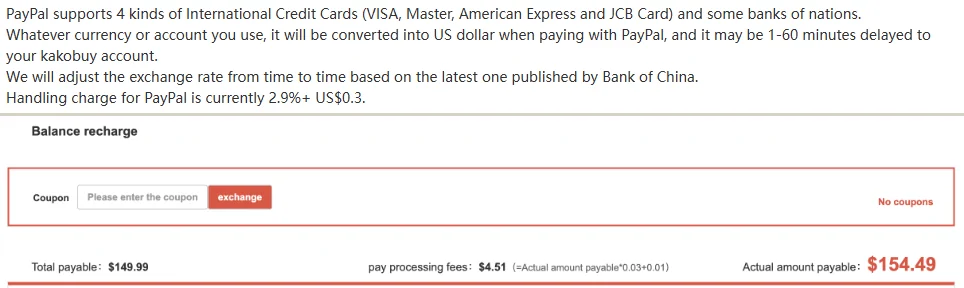
The captured article lists no agent handling charge for Alipay or WeChat and gives a 1–60-minute crediting range. That is a historical service description, not a guarantee of today’s arrival time or the absence of bank/wallet charges. Confirm that your account can use the method and compare the final debit.
For most readers outside China the real limit is access. Alipay and WeChat Pay need an account that can pay, and setting one up with a foreign card has its own terms and possible fees from your bank, which we cannot quote. If you already have a working wallet, compare its total debit and credited balance with the other eligible methods; your bank or wallet may have separate charges.
Either way, do not top up at the last minute before a sale ends; an hour of delay is within the listed range.
Cards, Wise and the methods in the checkout
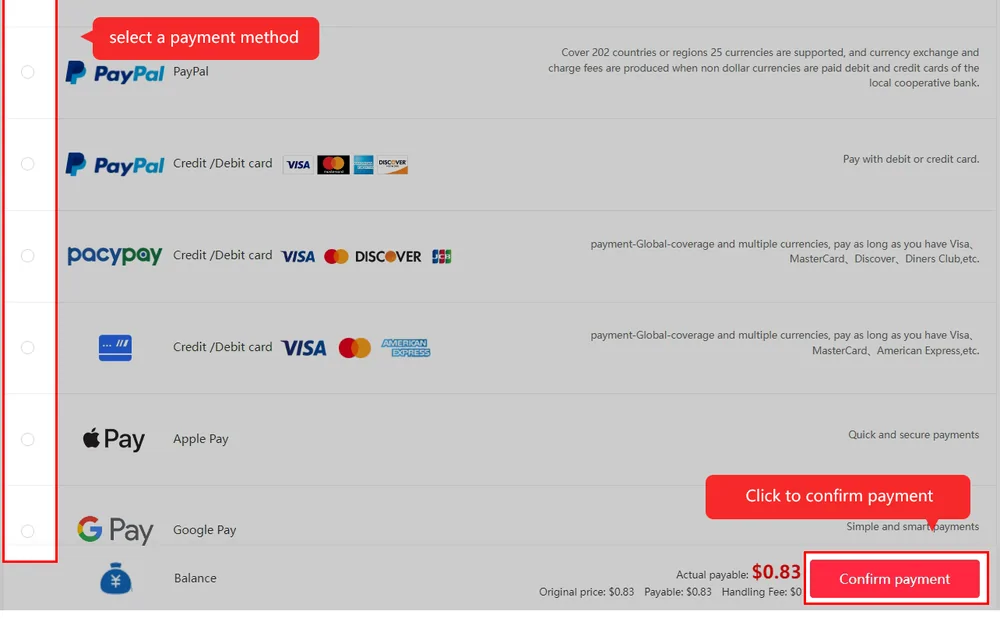
The captured card help article describes a PayPal card channel. The site footer and older tutorial also show other payment logos. Those images establish what was displayed then, not which method your account can use now or which provider fee will apply.
A footer logo or old tutorial does not establish current availability for your account. Before relying on a newer method, open the checkout counter and read the handling fee line for that method before you confirm.
Plan for the final freight adjustment
The parcel checkout can begin with an estimate, followed by a packed-weight adjustment. The published process describes excess freight returning to the account balance and a shortfall requiring settlement; its historical packing target is not a guaranteed refund deadline. Keep the estimate, final bill and balance entry as separate records.
That makes a small buffer in the balance useful. A parcel short by a few yuan does not ship, and topping up a few yuan by PayPal costs US$0.30 plus 3.5%. Combining payments can reduce repeated fixed charges but does not make the percentage fee disappear. Avoid a large unused balance; check withdrawal and refund conditions before adding a buffer.
Next lever down: Add-on services, worth US$5.49 on the reference order
Read the counter before you confirm
Check the currency charged, handling fee, balance credited and whether your bank or wallet will convert again. If the payable amount differs from this guide’s example, use the current checkout breakdown and ask official support to explain an unclear line before payment.
A smaller fee can leave a larger unresolved balance
Before combining future payments into one top-up, write down what you are ready to buy and what remains uncertain: seller stock, an eligible route or the final packed bill. Saving another fixed payment charge does not make an uncertain extra deposit necessary.
If money is already unused, identify the original recharge and ask which part is eligible for a return through that payment method. A cancelled purchase may first credit the Kakobuy balance; that is a separate event from a completed external refund. Send the relevant payment and order references to support, and check deductions before accepting a net refund amount.